17:59
17:59
 Ngọc Bích

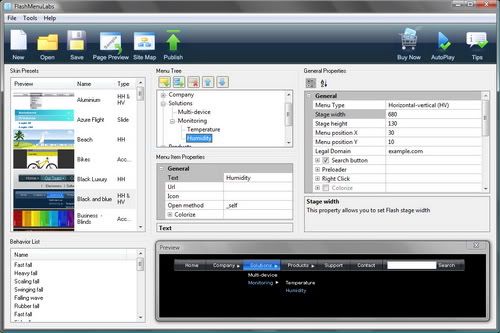
The FlashMenus.net UI gives you total control over menu parameters via a powerful and easy-to-use interface with built-in preview.

Download FlashMenus.net UI
Installation
If you have Adobe Extension Manager installed, just double click on MXP file to start installation process. Restart Dreamweaver.
Access
1) "Insert" ==> "FlashMenus.net menus" ==> "FlashMenus UI"
2) "Insertbar" ==> "FlashMenus.net menus" ==> "FlashMenus UI"
3) Press Ctrl+Shift+F
4) Right click menu in design mode on any FlashMenus.net menu.
NAVIGATION tab

Select a menu item in the tree.
- Name - selected menu item caption.
- Link - selected menu item URL.
- Target - target of selected menu item (_self - default, _blank - new window, _parent - parent of current frame, _top - top-level frame in current window).
- Add - adds new menu item in current position of the tree.
- Remove - removes selected menu item.
- Arrow buttons - moves selected menu item, up and down within the same level, left and right from level to level.
- Save - "as HTML on page" - navigation data will be inserted as SEO friendly HTML code on page, "as XML in file" - navigation data will be saved in separate file.
OPTIONS tab

General
- Menu width - width of the menu bar (px)
- Menu height - height of vertical menu(px)
- Action to open submenu - determines whether to upon submenu on click or rollover
- Submenu removal delay - delay in milliseconds of submenu removal
- Menu switch delay - regulates the menu tabs switch delay (Mac Style Menu)
- Submenu opening speed - speed of sub menu appearance
- Menu border color - color of the background border (iPhone Style menu)
- Menu background color - color of the menu background color
- Menu shadow transparency - regulates the transparency of the main menu shadow (0 - 100)
- Menu shadow height - height of the menu shadow
- Divider color - color of dividers between main menu items
- Remove dividers - (Yes/No) show or remove dividers between main menu items
- Text highlight color - text color in highlighted state of the menu item
- Max submenu height - maximum height of submenus (px)
- Minimal submenu width - minimal width of submenus (px)
- Max height with open submenu - maximum height of sliding/accordion menus
- Active button on this page - number of highlighted menu item on current page by default
- Active subbutton on this page - number of highlighted submenu item on current page by defaul
- Menu contrast - contrast of the menu (0-100)
- Submenu drop-out animation - on or off submenu drop-out animation
- Show main menu animation - on or off main menu animation
- Menu transparency - main menu transparency (0-100)
- Background transparency - menu background transparency (0-100)
- Buttons transparency - main menu items transparency (0-100)
- Highlight transparency - regulates the active menu item highlight effect transparency (0-100)
Search Settings
- Show search field - show or hide search field
- Show caption on top - show or hide the caption on top of the search (iPhone Style Menu)
- Search highlight color - color of the search field hightlight (Adobe Style Menu)
- Search field color - color of the search field
- Search button color - color of the search button
- Search input text color - text color in the search field
Sound Settings
- mainSoundURL - main menu rollover sound URL (mp3 file path)
- subSoundURL - sub menu rollover sound URL (mp3 file path)
- clickSoundURL - click sound URL (mp3 file path)
BUTTONS tab

Main menu buttons
- Button height - height of the main menu item (px)
- Button width - width of the main menu item (px)
- Button color - main menu item color
- Inactive button color - button color in non-active state
- Active button color - button color in the active state
- Text color - main menu text color
- Font size - main menu text font size
- Button font - main menu font
- Text alignment - main menu text alignment
- Button transparency - transparency of the main menu buttons (px)
- Highlight color - button highlight color in the active state
- Highlight transparency - button highlight transparency
- Text highlight color - text color in the active state
- Smooth surface - smooth the button surface (Macromedia Style Menu)
- Show bounce animation - Show/hide bounce animation (Cubic Menu)
- Show cubics - Show/hide cubics (Cubic Menu)
- Border color - menu item border color
- Edge color - menu button edge color (Edge Style Menu)
- Edge highlight color - edge color in highlighted stage (Edge Style Menu)
- Space between buttons - space between main menu items (Edge Style Menu)
Sub menu buttons
- Button height - height of the sub menu item (px)
- Button width extension - width extension of the sub menu item (px)
- Button color - submenu item color
- Button highlight color - submenu item color in the active state
- Border color - submenu border color
- Background color - submenu background color
- Button font - submenu text font
- Font size - submenu text font size
- Text alignment - submenu text alignment
- Text color - submenu text color
- Text highlight color - submenu text color in the active state
- Highlight color - submenu item highlight color in the active state
- Highlight transparency - submenu item highlight transparency
- Button transparency - submenu item transparency
- Remove lines - hide or show dividers between submenu items
- Highlight text - on/off rollover text highlighting (Mac Style Menu)
- Edge color - submenu button edge color (Edge Style Menu)
- Edge highlight color - edge color in highlighted stage (Edge Style Menu)
- Space between buttons - space between submenu items (Edge Style Menu)
POSITION tab
Menu position in HTML code and page
- Position type - absolute or relative position of the menu on page
- Centered - sets whether or not center the menu bar
- Top - menu position Y
- Left - menu position X
- Insert menu at - select "the insertion point", "document body" or any other DIV with id
Menu files placement
- File folder - folder for the menu files

PREVIEW tab (Windows only)

In the PREVIEW tab you can instantly examine actual menu.
PRESETS tab
Configuration presets
- Select menu configuration - select menu configuration preset for load or delete
- Save menu configuration as - specifies new configuration preset name
Navigation presets
- Select navigation structure - select navigation presets for load or delete
- Save navigation structure as - specifies new navigation preset name